Prepared for Jimmy Wilson

A LIMS migration plan built around your lab's workflow.

Southeastern Labs and Enersolv do not need another generic system demo. You need confidence that sample login, worklists, review, reporting, EDDs, standards, scheduling, and invoicing can move without another hard-cutover nightmare.

2 labsDecatur + Florence
No seat taxFlat hosting model
Cloud-hostedManaged by Clearline
Clearline LIMS - Environmental workflow

Lab queue

Due today

DEC-2401Municipal weekly - TSS, BOD, NH3Reportable
FLO-1188Industrial quarterly - metals packageQA review
DEC-2402Recurring kit - wastewater complianceHold time
SUB-0447Subcontracted addendum receivedAttach
What we heard

The risk is not buying software. It is surviving implementation.

You have been through enough LIMS installs to know the pain: big vendors, forced migrations, missing sample codes, disconnected review screens, and workflows that make a strong lab slower.

Preserve the workflow

Login, labels, cooler temperature, departmental worklists, analyst review, QA review, reportable status, emailed reports, and monthly invoicing should map to how the lab already operates.

Prove the specific gaps

EDD formats, reagent standards, recurring bottle kits, instrument uploads, subbed-result addendums, and multi-location operations deserve direct proof - not vague feature language.

Avoid the hard cutover

The migration should be phased: discovery, workflow mapping, prototype, data migration plan, user acceptance, and go-live only when the core paths are ready.

Clearline's stance: use the LIMS to support the mature lab process you already built, not force the lab to reorganize around a vendor's favorite screen layout.

"
Workflow fit

How Clearline maps to the areas we discussed.

The screenshots below are from a live Clearline LIMS demo environment. They show the system structure we would use as the starting point, then configure around Southeastern's methods, exports, report formats, client rules, and review process.

Sample lifecycle

Sample work can be organized by operational state, with receiving, client, contact, type, priority, invoice, and review context kept on the sample record.

Clearline separates reception pending, received, to-be-verified, verified, published, dispatched, cancelled, and invalid work so staff can work from operational queues instead of hunting through one flat list.

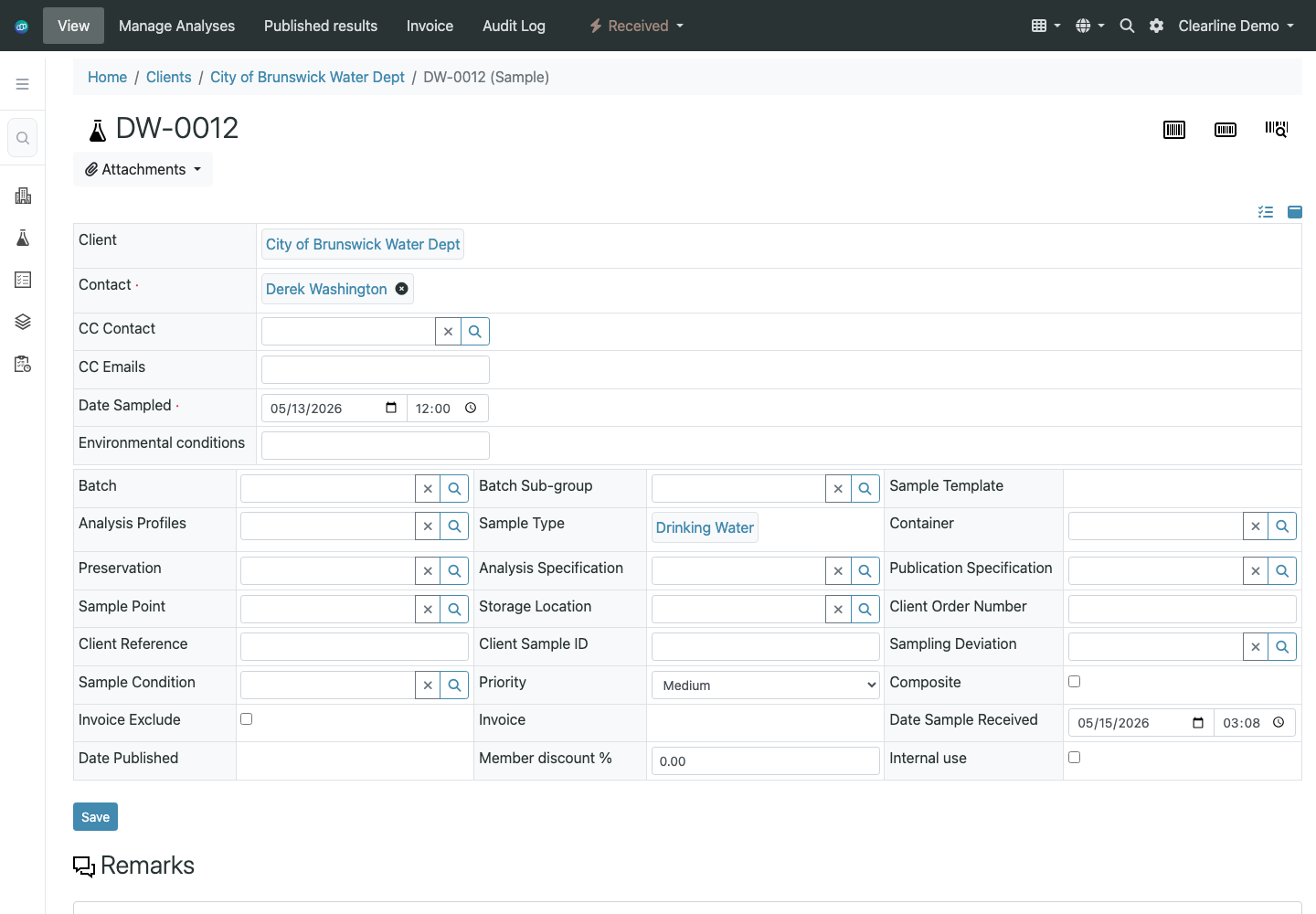
For Southeastern, the intake screen would be configured around the details your login team actually captures: cooler temperature, COC details, bottle/container expectations, sample point, client reference, and received date.

Shown below: sample queue + sample record
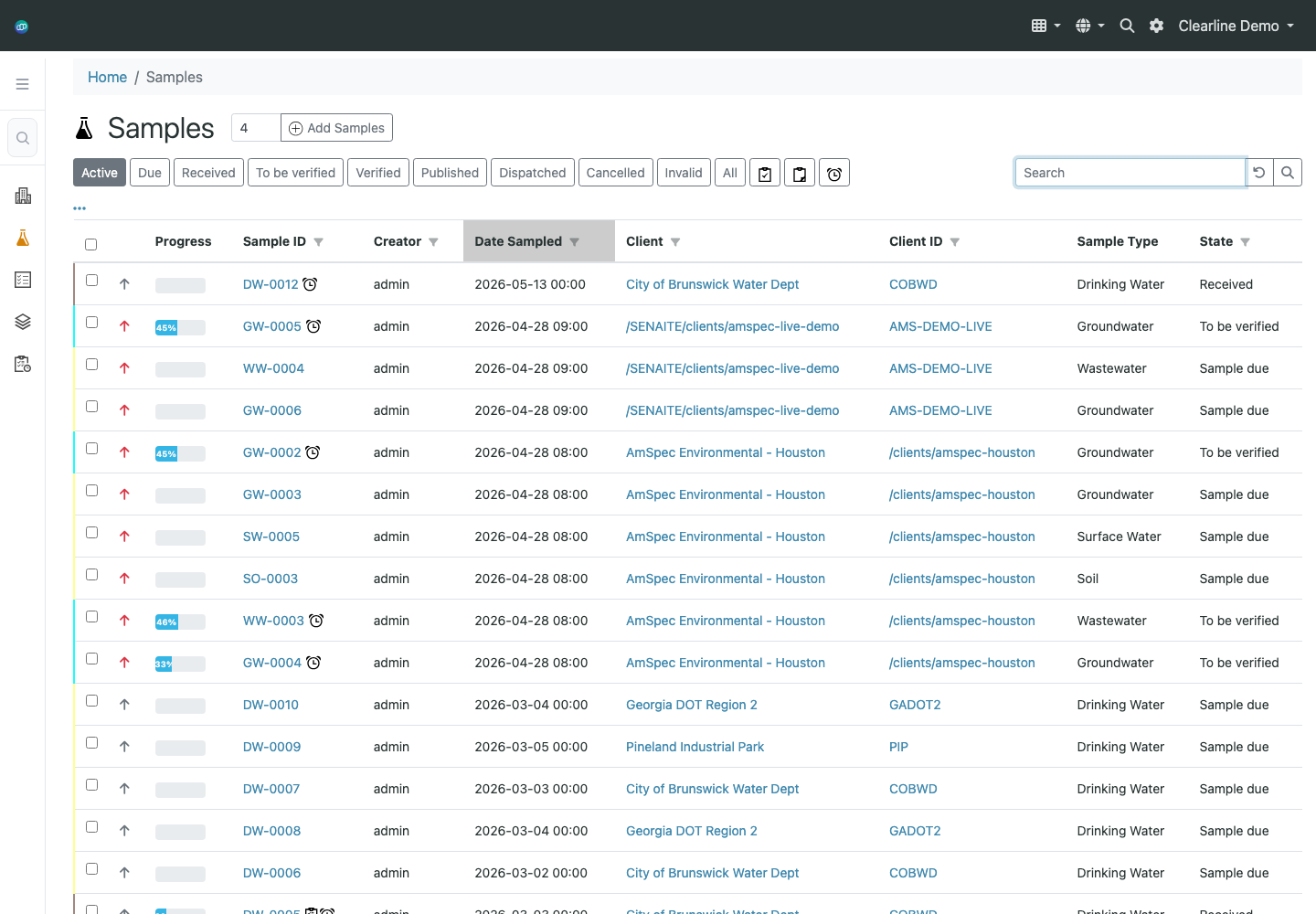
Clearline LIMS sample queue with received, due, and verification states
Sample queue by status. The lab can filter work by received, due, to-be-verified, verified, published, dispatched, and related states.
Clearline LIMS sample detail record with client, contact, sample type, date sampled, priority, invoice, and received date fields
One sample record, operational fields together. Client, contact, sample type, dates, sample point, storage, invoice, priority, and received-date context live on the sample.
TSS and method templates

TSS methods can be managed as configured method records, then tied into worksheet fields, calculations, limits, review rules, and reporting behavior.

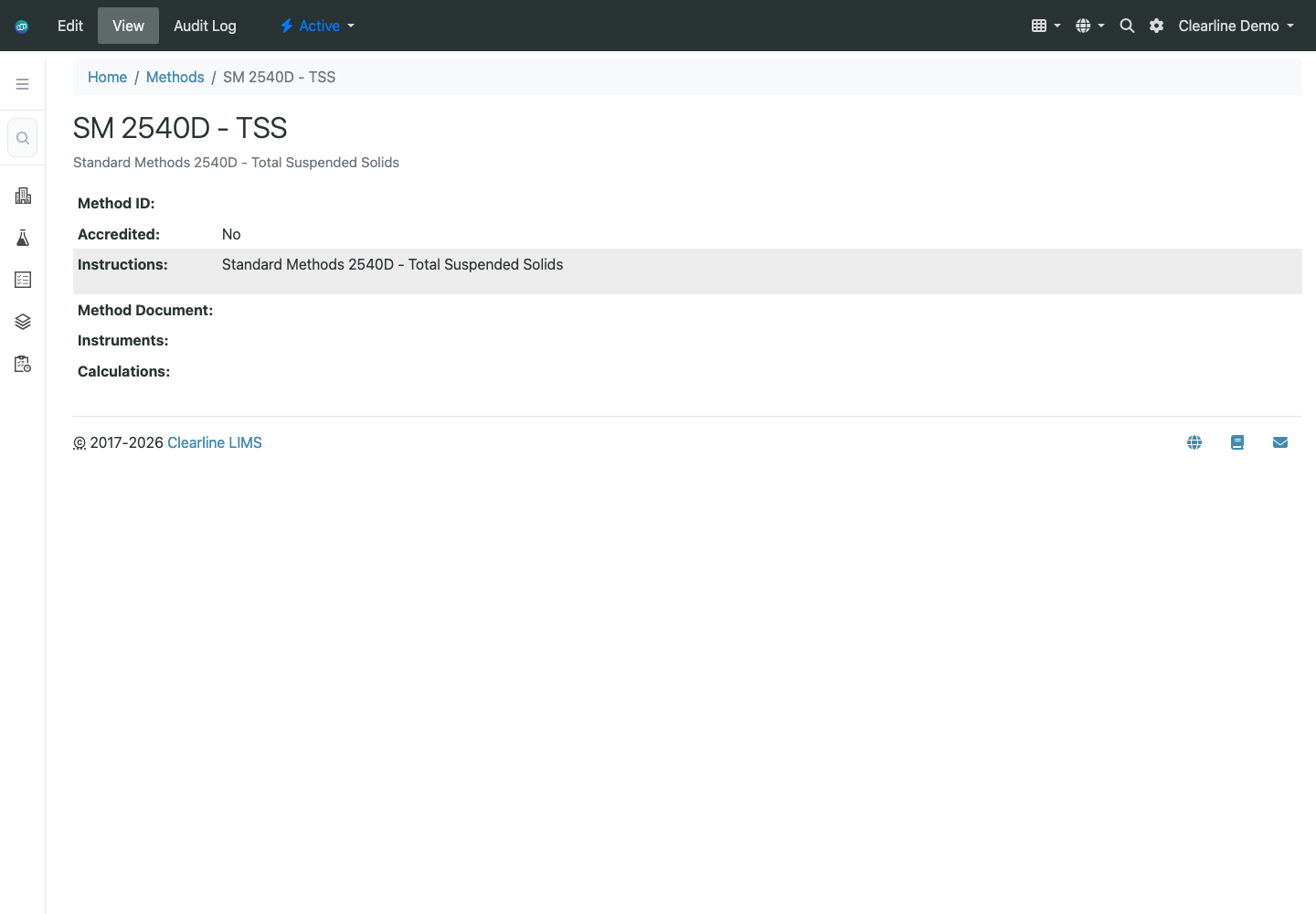
The LIMS keeps methods as configured objects rather than loose text on a report. That gives the implementation a stable place to connect method instructions, accreditation status, calculations, instruments, worksheets, and reporting rules.

A focused validation step would be to configure one Southeastern TSS package end-to-end: login requirements, worksheet inputs, calculation/result fields, QA exceptions, report wording, and EDD mapping.

Shown below: method catalog + SM 2540D TSS record
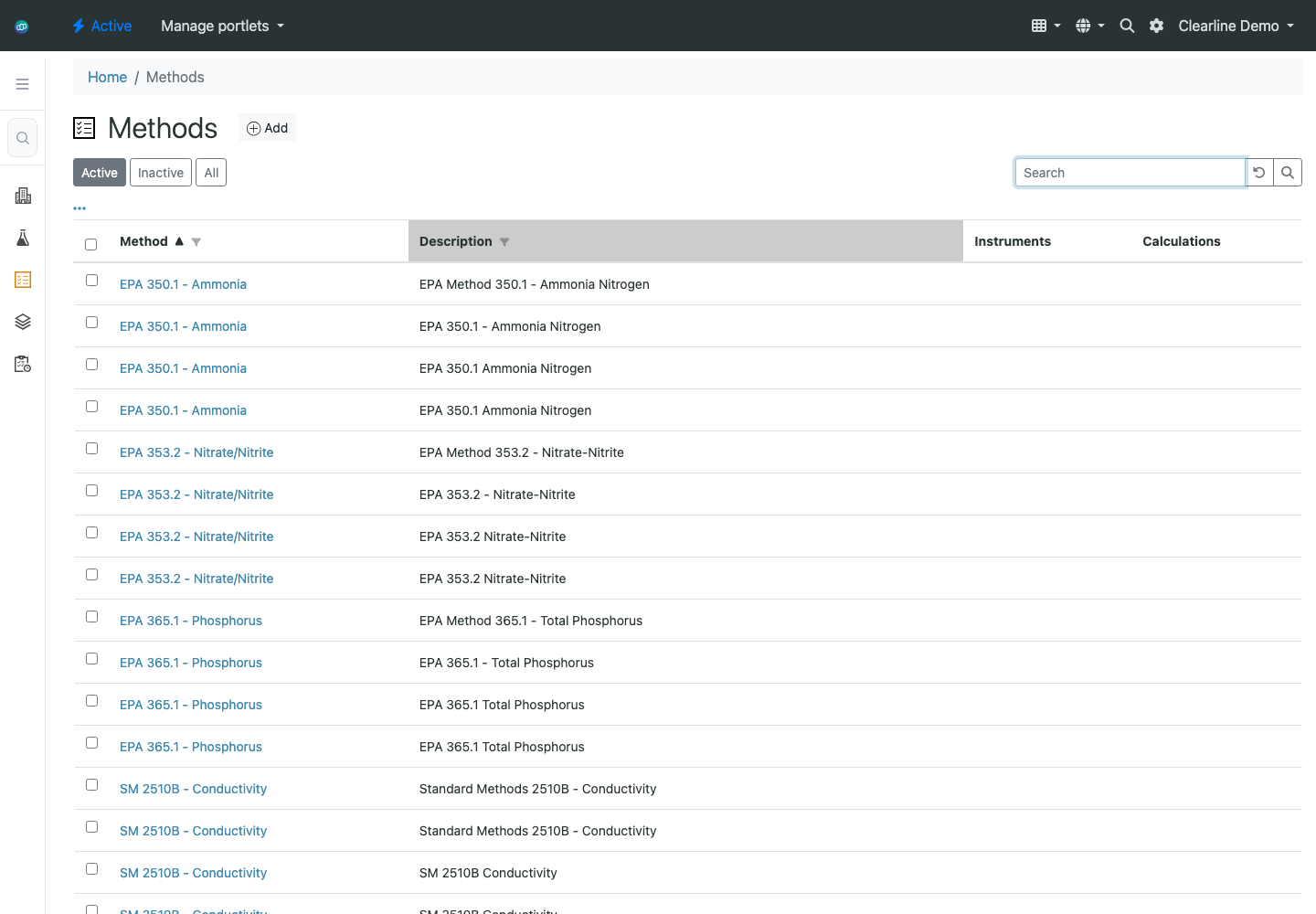
Clearline LIMS method catalog showing environmental methods including SM 2540D TSS
Method catalog. Environmental methods, including SM 2540D TSS, are managed as first-class setup records.
Clearline LIMS SM 2540D TSS method detail page
TSS method detail. The method record is the anchor for instructions, accreditation, attachments, and downstream worksheet/report behavior.
Worksheets and instrument results

Analysts can work from worksheets for result entry and review. Instrument imports are mapped per instrument/export format so the workflow matches the files your lab actually produces.

The demo shows worksheets with analyst assignment, instrument filters, templates, samples, routine analyses, QC analyses, and result-management actions.

For Southeastern, we would start with one export from a key instrument, document the column mapping and sample-matching rules, then prove the import into worksheet results before committing that path to go-live scope.

Shown below: worksheet queue + worksheet result screen
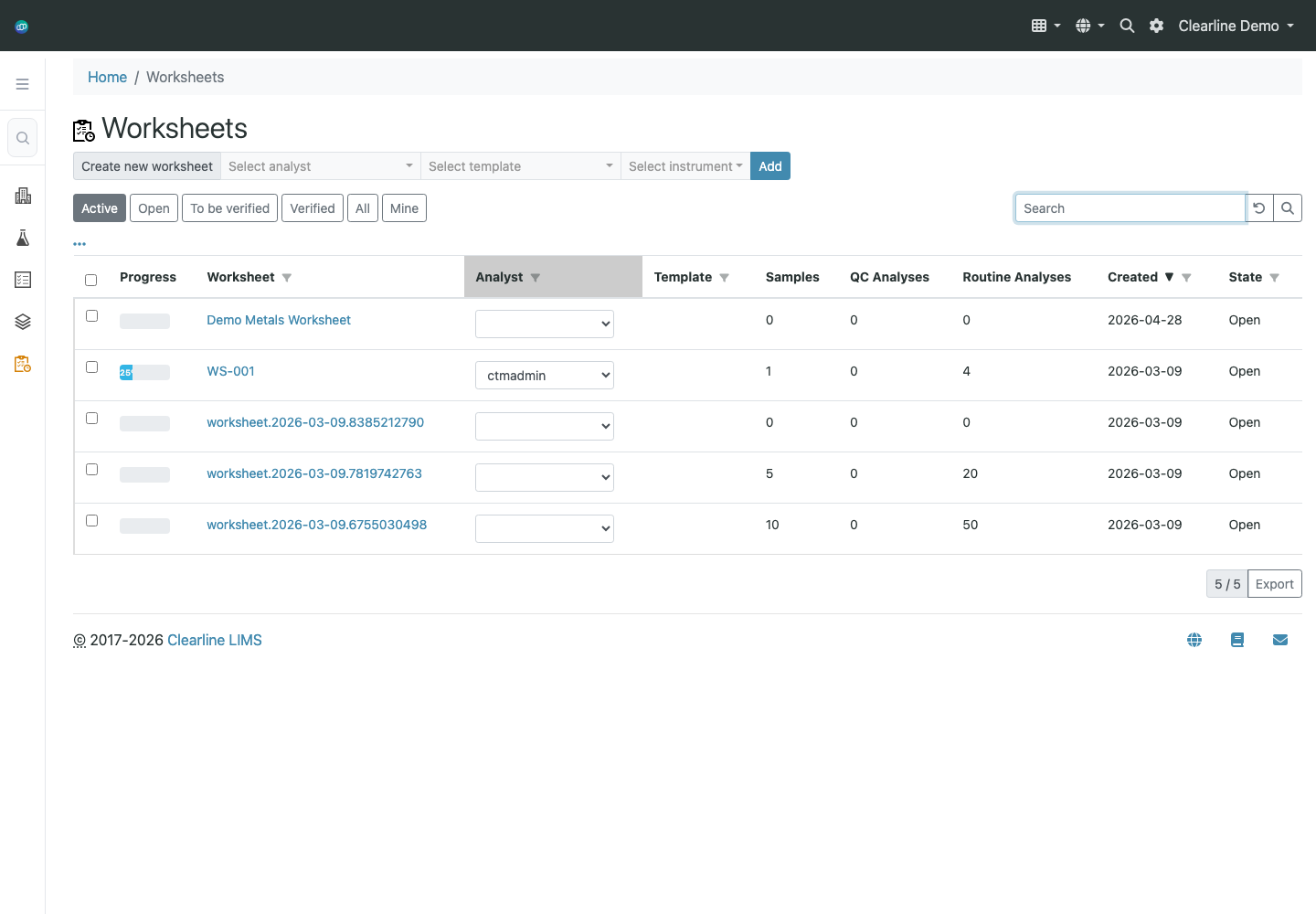
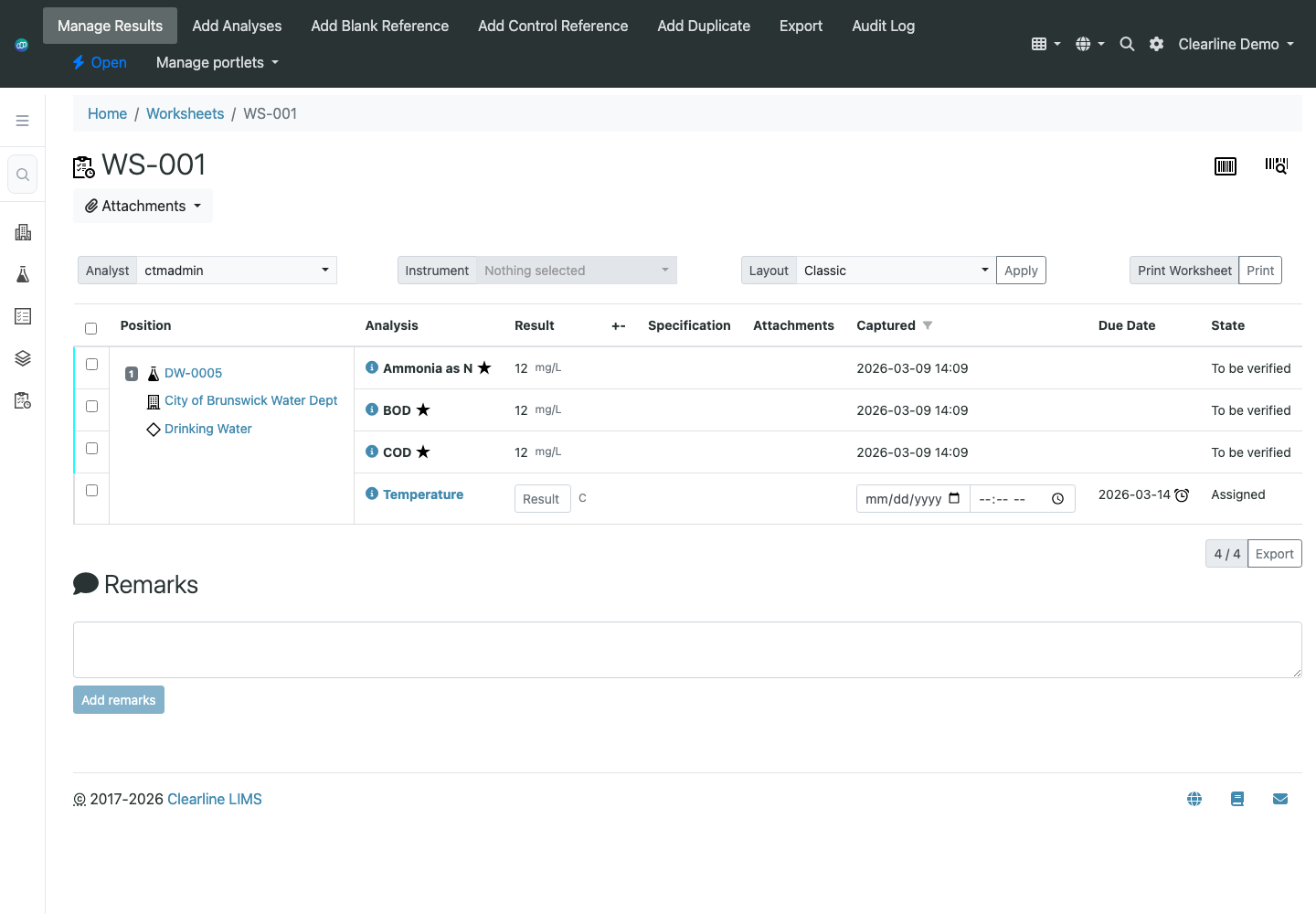
Clearline LIMS worksheets list with analyst, template, instrument, sample, QC, routine analysis, created, and state columns
Worksheet queue. Worksheets track analyst, template, instrument, sample count, QC count, routine analysis count, created date, and state.
Clearline LIMS worksheet result management screen with add analyses, reference, duplicate, export, and audit actions
Manage results. Analysts can work results, add analyses, add references/duplicates, export, and preserve audit history from the worksheet.
Instruments, QC, standards, and reagents

Clearline has the setup structure for instruments, reference definitions, suppliers, storage locations, labels, and departments. Standards and reagent tracking would be configured around Southeastern's audit requirements.

The foundation is already present: instruments, instrument types, manufacturers, suppliers, storage locations, reference definitions, labels, and lab departments all exist as managed setup areas.

A focused validation step would be one standard/reagent example with supplier, lot, prep date, expiration, COA attachment, printable label, and usage trace.

Shown below: instrument registry + reference definitions
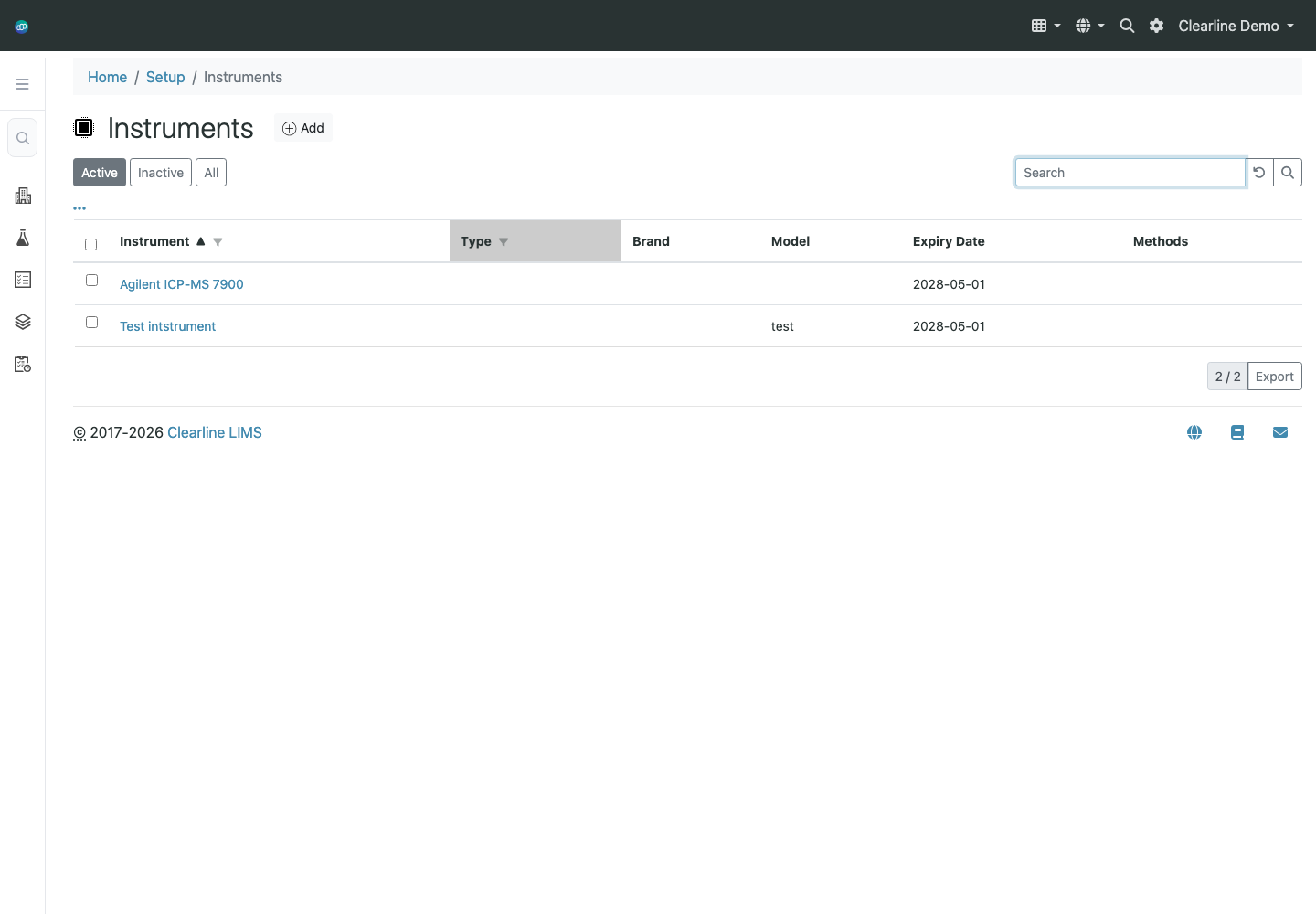
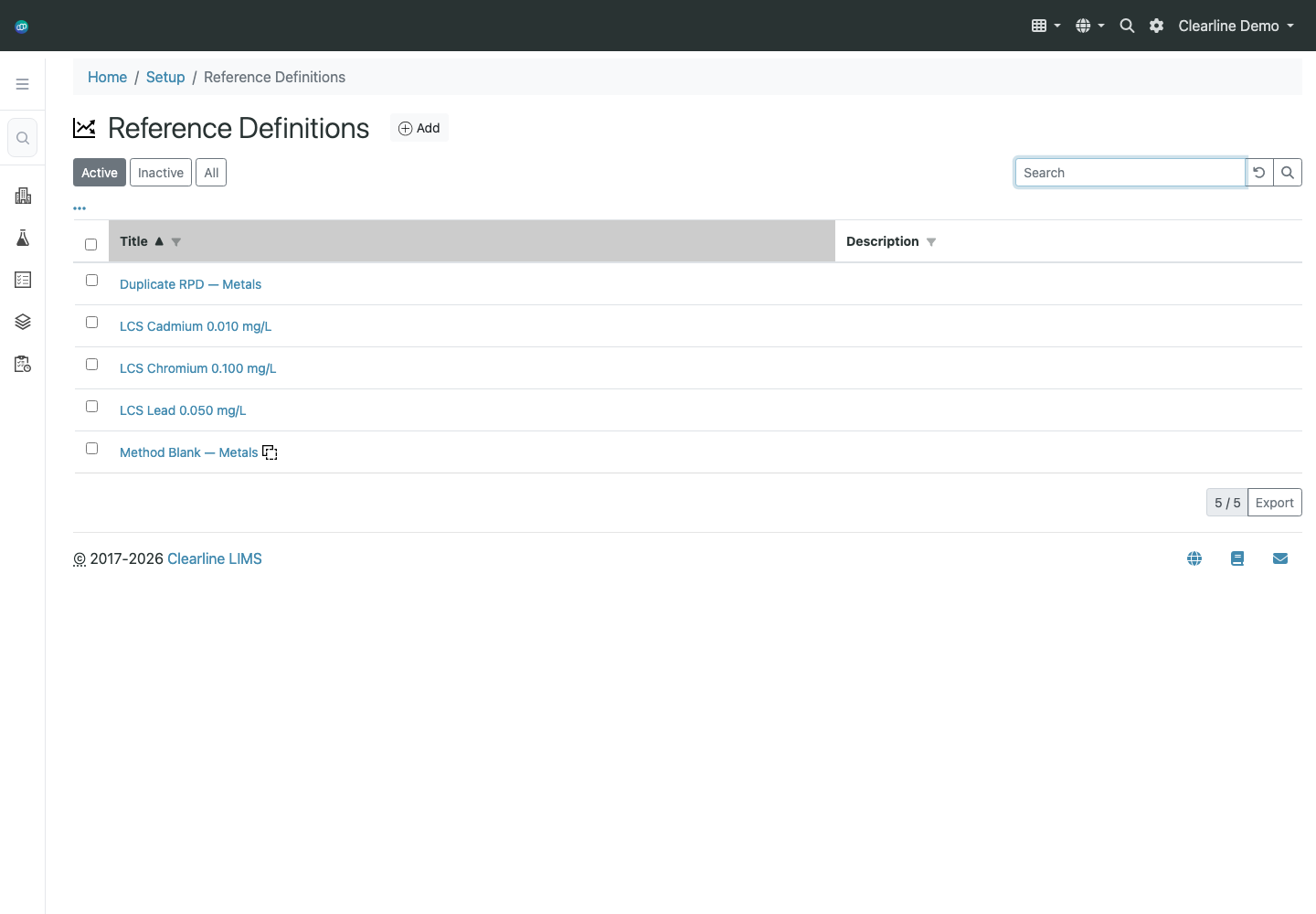
Clearline LIMS instrument registry with instrument type, brand, model, expiry date, and methods
Instrument registry. Instruments can be managed with type, brand/model, expiry, and method linkage.
Clearline LIMS reference definitions list with LCS and method blank records
Reference definitions. QC/reference materials such as LCS and method blanks can be part of the configured lab model.
Recurring work, bottle kits, locations, and client outputs

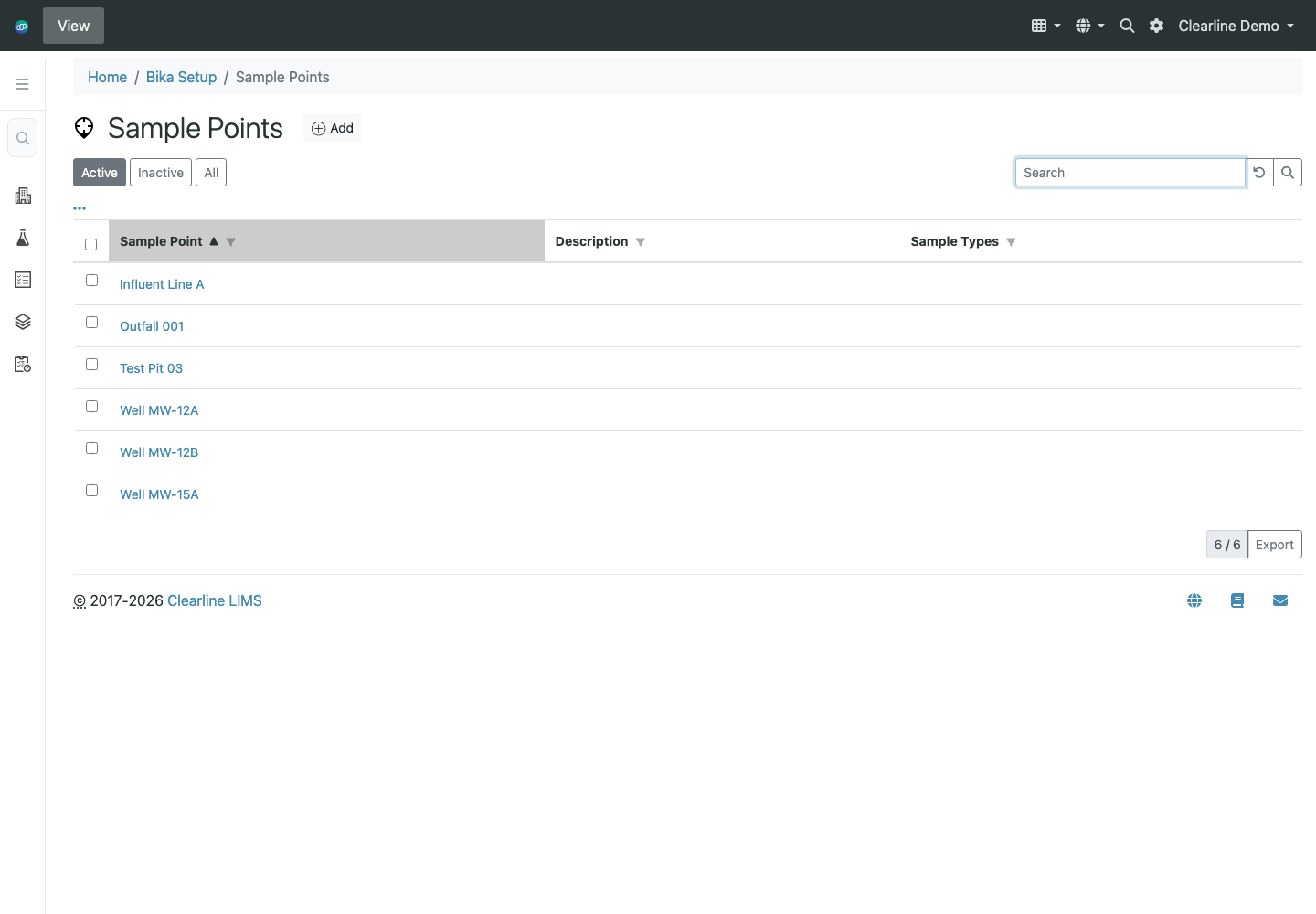
The setup model supports clients, sample points, sample templates, sample types, labels, containers, preservatives, and analysis profiles. Recurring kit logic can be built from those reusable pieces.

The demo has client records, sample points, analysis profiles, sample templates, sample types, sample containers, sample preservations, and labels in setup. That is the structure needed for recurring work and bottle-prep standardization.

For client-specific EDDs and reports, the most useful next step is to use one of Southeastern's actual report or EDD formats. That lets the prototype prove the real output shape, not just a generic export.

Shown below: clients + sample points
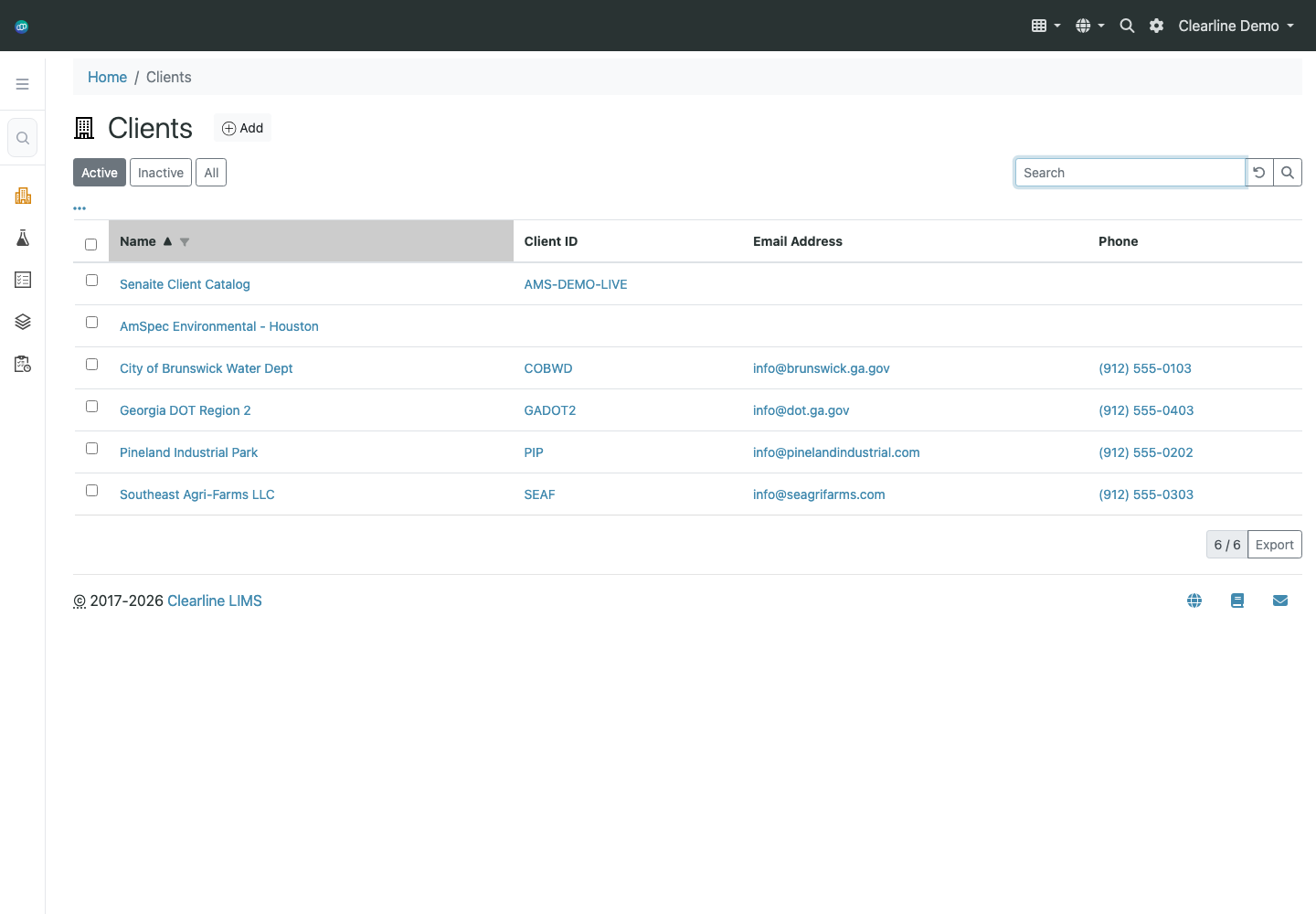
Clearline LIMS client list with client ID, email, and phone
Client records. Client identity and client IDs are available for report/export routing and recurring work setup.
Clearline LIMS sample point setup list with outfall, influent, well, and test pit examples
Sample points. Recurring locations such as outfalls, influent lines, wells, and pits can be configured as reusable sample points.
Proof package

Representative workflow examples.

These are representative Clearline workflows for discussion. The production implementation would be configured around Southeastern's methods, client formats, instrument outputs, review rules, and invoicing structure.

Cradle-to-grave sample workflow

A clean operational path: received, batched, analyzed, reviewed, reportable, reported, and invoice-ready.

1
LoginCooler temp, COC, labels
2
WorklistMethod, department, analyst
3
ResultsManual or instrument upload
4
ReviewAnalyst then QA review
5
ReportEmail, portal, invoice batch

Role-aware queues

Analysts can focus on their own tests while managers retain full queue visibility.

Traceable review

Each approval step preserves who changed what, when, and why.

Monthly invoicing

Reported work can roll into end-of-month billing instead of forcing per-sample invoicing.

Representative TSS method template

This is the kind of configured template we would build with Southeastern's real method rules, units, reporting limits, calculations, and review checkpoints.

Method profileTSS
DepartmentInorganics / Wet chemistry
MethodSM 2540 D - Total Suspended Solids
Unitsmg/L with client-specific decimal rules
Hold time7 days from collection, flagged on queue
ReviewAnalyst check, QA review, reportable release
Template controlsConfigured
Worksheet fields for initial/final weights, volume, dilution, and qualifiersOK
Automatic result calculation with exception flags before QA reviewOK
Reusable bottle/label instructions for recurring wastewater clientsOK
Report and EDD output mapping from the same approved resultOK

The real implementation step is to take one of Southeastern's actual TSS examples and configure it end-to-end: login fields, worksheet, calculation, review, report wording, and export behavior.

Instrument output to reviewed result

Clearline can map instrument CSV/export files into sample worksheets so analysts review exceptions instead of retyping rows.

Instrument export.csv
SampleAnalyteResult
DEC-2401TSS14.2
DEC-2401NH3-N0.41
FLO-1188Lead0.003
Clearline worksheetMapped
Ready for analyst review

During implementation, we would collect real export files from your instruments, document the mapping rules, and test them against representative samples before go-live.

Reagent and standard inventory

Standards should be audit-ready: supplier, preparation, expiration, labels, certificate of analysis, and usage history tied back to methods and batches.

NH3 Standard

ID
STD-NH3-042
Expires
2026-08-31
COA
Attached
Status
Active

TSS Filter Lot

ID
FLT-TSS-117
Prepared
2026-05-10
Label
Printable
Status
In use

Metals QC

ID
QC-MET-029
Supplier
Configured
COA
Attached
Status
Review
Audit lookup: Reagent ID STD-NH3-042 opened during audit by QA Manager.
Trace: Certificate viewed, expiration verified, linked batch history exported.

Recurring schedules and bottle-prep kits

For clients sending the same work weekly, monthly, or quarterly, scheduling should produce expected samples, containers, labels, and prep lists before the courier arrives.

May recurring work
1
2
3
4
5
6
7
8
9
10
11
12
13
14
15
16
17
18
19
20
21
22
23
24
25
26
27
28
Municipal weekly wastewater kitDEC-2401
Industrial monthly metals kitFLO-1188
Quarterly compliance bottle setDEC-2402
Labels and COC ready for printReady

Per-client EDD and report packages

Different clients can receive different EDD layouts and report packages without changing the rest of the lab workflow.

Client A - custom EDD Client B - standard PDF Project manager copy
SampleID
Analyte
Result
Qualifier
DEC-2401
TSS
14.2 mg/L
DEC-2401
NH3-N
0.41 mg/L
FLO-1188
Lead
0.003 mg/L
J

Client-specific

Export structure can be configured around the client's required format.

Report aligned

EDD, PDF, addendums, and email delivery can follow the same reportable event.

Controlled changes

Format changes are versioned so you know what changed and when.

Implementation approach

Designed to avoid another October 1 hard cutover.

The goal is boring reliability: prove the core paths, migrate the right data, train by role, and only switch when the lab can run the day without heroics.

Phase 1

Workflow discovery

Map sample login, departments, worklists, methods, review states, reporting, invoicing, and sister-company access.

Phase 2

Prototype and mapping

Configure representative methods, EDDs, standards inventory, recurring kits, and instrument import samples.

Phase 3

Data migration and UAT

Move the data that matters, test with real users, compare reports, and fix workflow gaps before go-live.

Phase 4

Phased go-live

Roll into production with fallback planning, role-based training, and support during the first reporting cycles.

Suggested next step

Regroup after the Clinisys meeting with the hard dates on the table.

If Clinisys gives you a firm Element timeline, we can build the migration plan around it. If they stay vague, we can help you get ahead of the risk before it becomes urgent.

What Clearline can prepare next

  • A short TSS/template walkthrough using a representative method.
  • An instrument-upload walkthrough using sample CSV output.
  • A report-generation and client-specific EDD example.
  • A deeper implementation estimate after workflow discovery.

What we would want from Southeastern

  • One or two representative report/EDD formats.
  • Sample instrument export files from key departments.
  • A standards/reagent label or inventory example.
  • A list of recurring client kit patterns and site/location rules.